Access Manager is the security brain of Teamcenter. It decides who can do what on which object — for example, who can read, edit, delete, approve, or release product data.
Three ACL types in a simple visual view
Rule-Based ACL
Default security behavior controlled by conditions such as group, role, ownership, or object type.
Object-Based ACL
Special access directly assigned to one specific object.
Workflow in Teamcenter ACL
Access that changes depending on workflow stage such as draft, review, or released.
What is Access Manager in Teamcenter?
Access Manager in Teamcenter is the central security engine that controls permissions on objects. It decides whether a user can read, modify, delete, or interact with data based on defined rules and conditions.
Quick comparison
| ACL Type | Best way to think about it | Real use |
|---|---|---|
| Rule-Based | Normal company-wide rule | Engineering can edit, manufacturing can read |
| Object-Based | Special exception for one object | Confidential prototype only visible to a small team |
| Workflow in Teamcenter | Stage-based lock or restriction | Object becomes read-only during approval |
Rule-Based ACL
This is the most common ACL type. It defines default access based on conditions such as user group, role, ownership, or object type.
Easy example: Engineering can edit Item Revisions, manufacturing gets read-only access, and suppliers get no access.
Object-Based ACL
This is used when one object needs stronger or different access than the normal system rule.
Example: a confidential engine prototype is restricted to only the project core team even though the normal rule allows wider Engineering access.
Workflow in Teamcenter ACL
This changes access based on workflow stage.
- Draft: edit allowed
- Review: read-only
- Released: locked
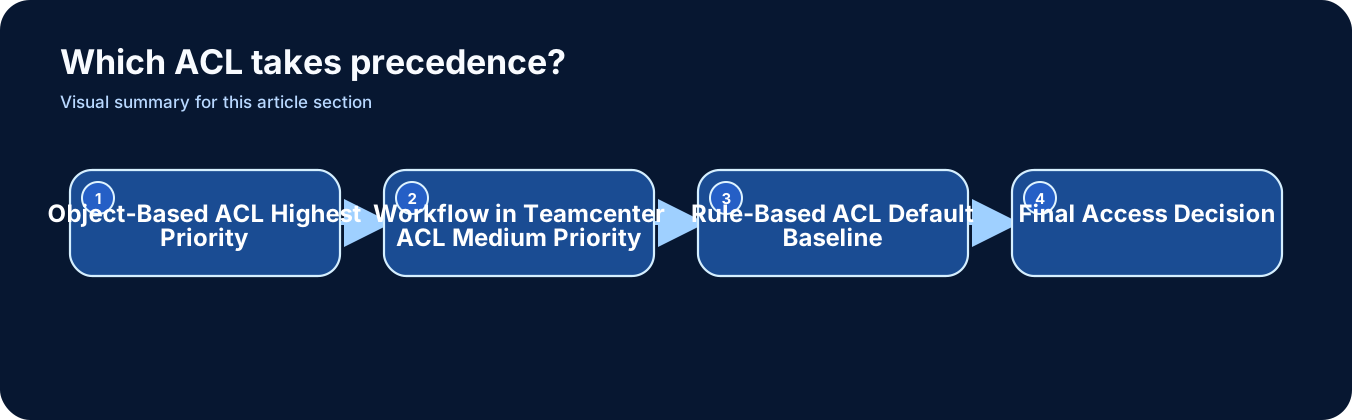
Which ACL takes precedence?
The more specific rule wins. The visual order below is the easiest way to remember it.
How to manage ACL in Teamcenter (step-by-step)
In real projects, ACL is not just theory. It is configured using Teamcenter tools like Access Manager, object properties, and Workflow in Teamcenter Designer.
Rule-Based ACL setup
Access Manager – Rule-Based ACL
- Open Access Manager
- Select object type such as Item or ItemRevision
- Define conditions based on group, role, ownership, project, or type
- Assign privileges like read, write, delete, or change ownership
Object-Based ACL setup
Object Properties – Access Control
- Open the specific object
- Assign a dedicated ACL
- Use this for restricted projects, confidential items, or special exceptions
Workflow in Teamcenter ACL setup
Workflow in Teamcenter Designer – Access Control
- Open Workflow in Teamcenter Designer
- Select the task or stage
- Set read-only, no-modify, or restricted behavior during review and release phases
Real project scenario: When ACL goes wrong (and how it was fixed)
In a real aerospace project, a company was developing a new engine component. Multiple departments were involved — design, manufacturing, and suppliers.
The problem
One engineer updated a critical design during the review phase. The design was already under approval workflow, but the system still allowed modification. The reviewer unknowingly approved the outdated version.
- Wrong version moved forward
- Manufacturing started with incorrect data
- Rework cost increased significantly
Root cause
- Rule-based ACL allowed Engineering to edit Item Revisions
- No Workflow in Teamcenter ACL was applied during review
- Object-level restriction was missing for critical items
The issue was not engineering discipline. The issue was incorrect ACL setup.
The fix
- Rule-Based ACL: kept for default access
- Workflow in Teamcenter ACL: added read-only restriction during review
- Object ACL: applied for critical components
After the fix
- No modification allowed during review stage
- Critical components had restricted access
- Approval process became stable and traceable
Common mistakes in ACL setup
Overcomplicated rules
Too many conditions make the system difficult to debug and maintain.
Ignoring precedence
Teams forget that object-based ACL can override broader rules and create unexpected results.
Too many object-level ACLs
Using object ACL everywhere instead of strong rule-based logic creates long-term confusion.
Workflow in Teamcenter not locking data
If workflow ACL is not configured, users may modify data during approval stages.
No testing with real roles
ACL tested with admin users only often fails in production for actual business roles.
Supplier access not controlled
External users can get unintended visibility when ACL design is weak or inconsistent.
Final summary
- ACL means access permission.
- Rule-based ACL is your default security model.
- Object-based ACL is your exception or override.
- Workflow in Teamcenter ACL changes access during lifecycle stages.
- Object-based ACL usually has the highest precedence.