1. What T4EA really is
Most quick explanations reduce T4EA to “integration between Teamcenter and ERP.” That is too small.
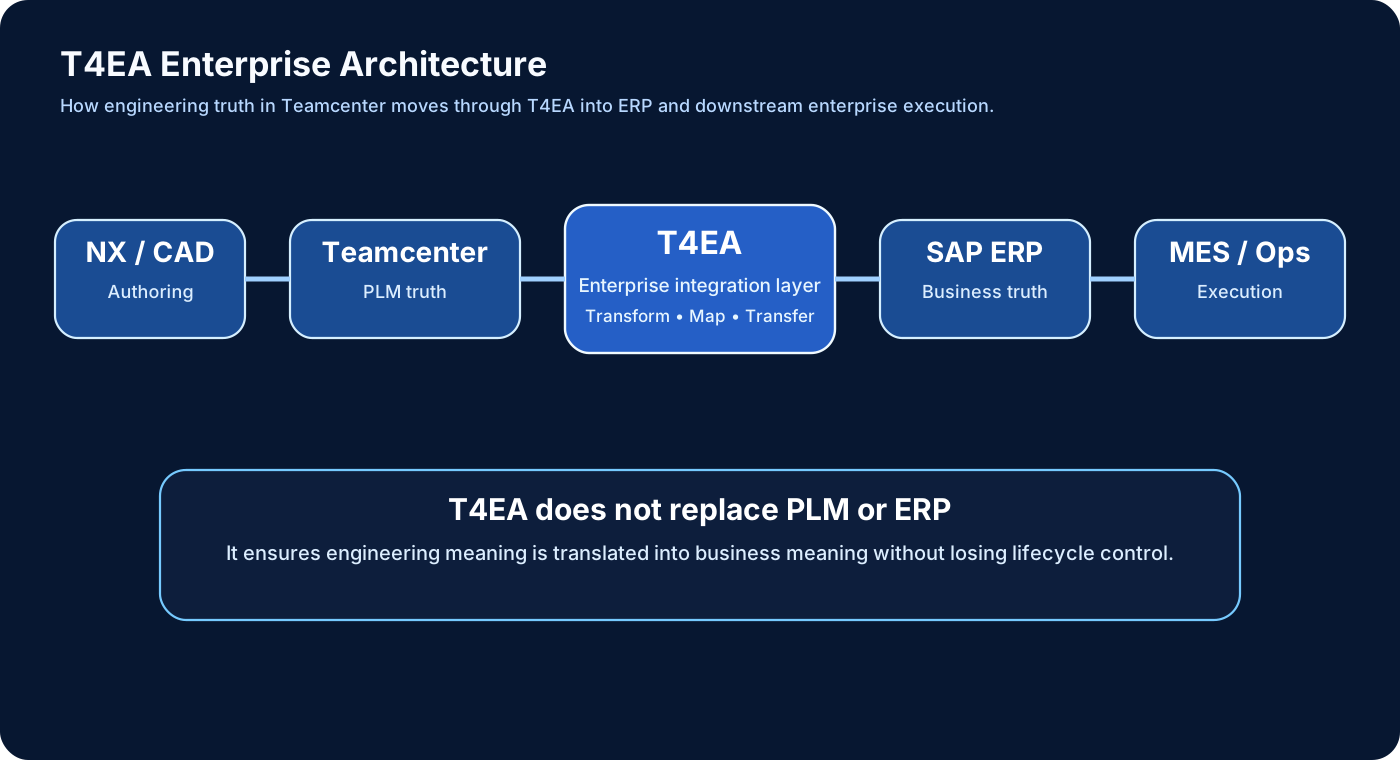
A better understanding is this: T4EA is the enterprise integration framework that synchronizes product definition in PLM with business execution in ERP.
It is responsible for moving data, but more importantly, for preserving business meaning while that data moves.
2. The real problem T4EA solves
Teamcenter and ERP do not speak the same language even when they are talking about the same product. Teamcenter thinks in items, revisions, relationships, and product structures. ERP thinks in materials, plants, procurement, cost, and execution.
Without a controlled integration layer, the company starts duplicating data manually. That leads to mismatches, wrong procurement, wrong BOM interpretation, and weak lifecycle continuity.
3. Where T4EA fits in enterprise architecture
In a typical landscape, engineering begins in CAD and Teamcenter. Business execution happens in SAP or another ERP. T4EA sits between them as the controlled integration intelligence layer.
CAD (NX)
   ↓
Teamcenter (PLM)
   ↓
T4EA (Enterprise Integration Layer)
   ↓
SAP ERP / S4HANA
   ↓
MES / Shopfloor / Business Execution
T4EA is not the user interface, not the design authoring system, and not the ERP database. It is the layer that makes those systems communicate with meaning.
4. Internal architecture of T4EA
This is where the discussion becomes more architectural than tutorial-level.
T4EA core engine
The core engine manages communication, integration transactions, and execution flow.
Mapping framework
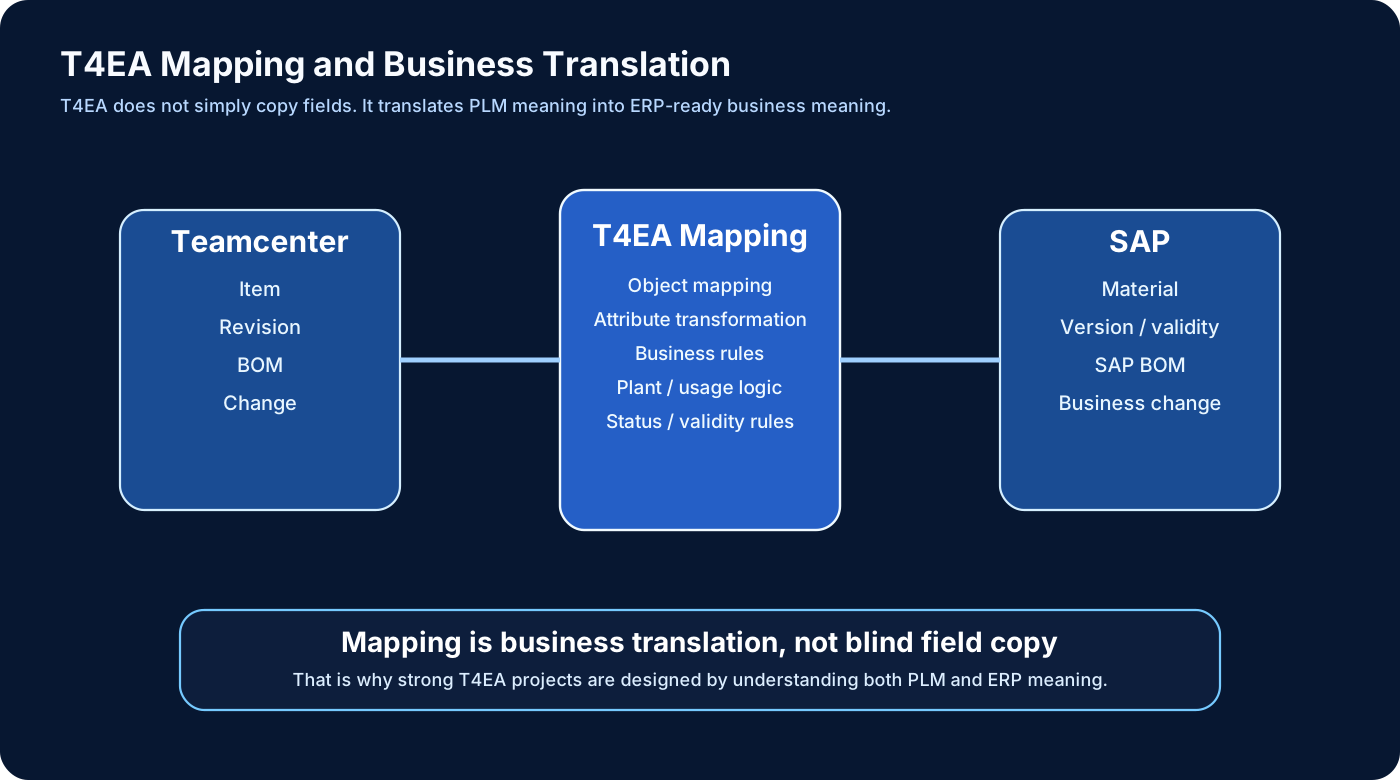
This is the heart of T4EA. Mapping is not just copying fields from one place to another. Mapping transforms product information from Teamcenter meaning into ERP meaning.
Queue and dispatcher logic
Enterprise systems do not always respond at the same speed. Queue-based processing, async handling, and retry patterns help keep the landscape stable.
Communication layer
This may rely on SAP RFC, APIs, services, or enterprise communication methods depending on the architecture.
5. Why mapping is the real heart of T4EA
The biggest mistake in integration thinking is to assume that one field in Teamcenter simply equals one field in SAP. Real enterprise integration does not work that way.
T4EA mapping often transforms:
- object types
- attribute names
- structure meaning
- business context
- lifecycle interpretation
Example:
- Teamcenter Item may become SAP Material
- Teamcenter revision may influence version or validity logic
- Teamcenter BOM line may become SAP BOM component with plant-specific meaning
That is why mapping is business translation, not simple field copy.
6. End-to-end T4EA flow
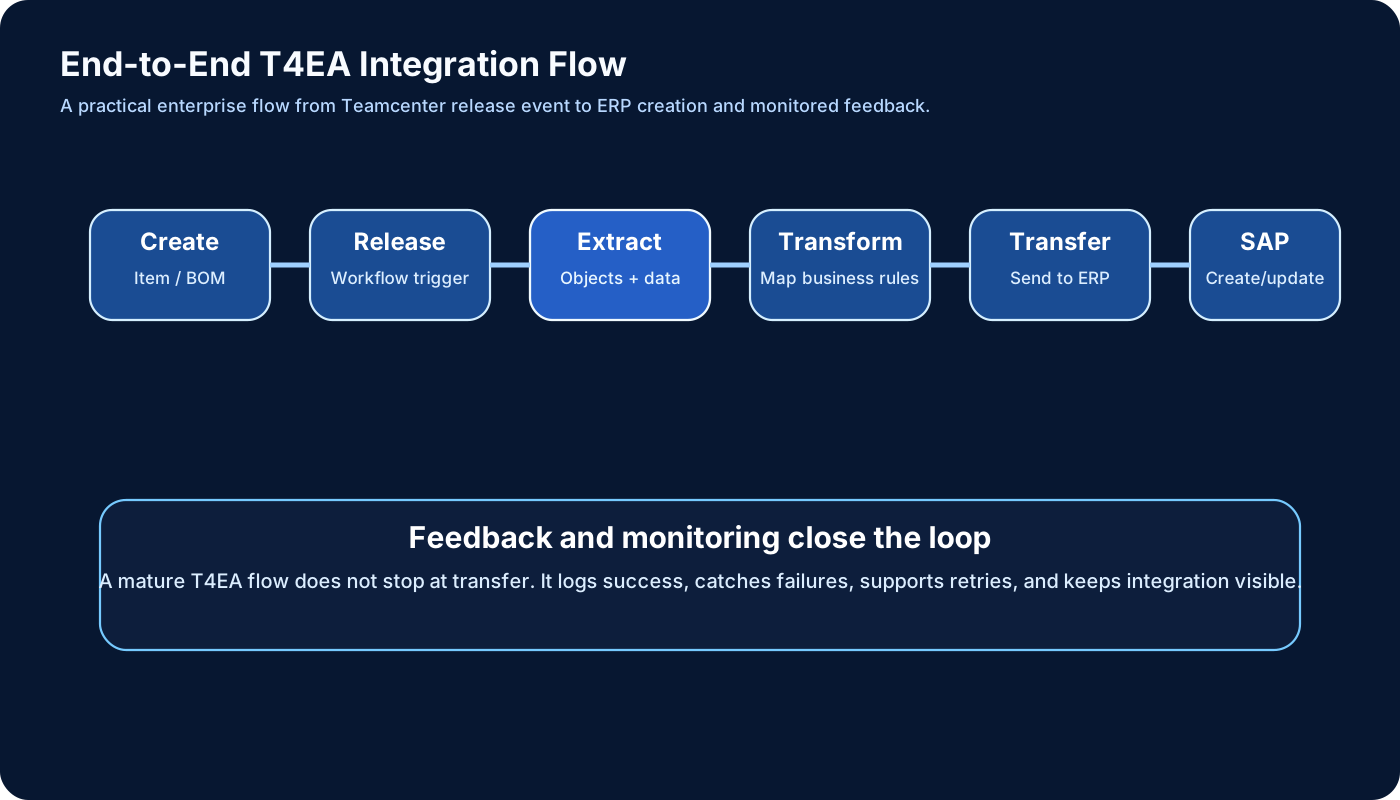
A real enterprise integration usually follows a controlled flow:
- Data is created or updated in Teamcenter.
- A trigger occurs, often based on workflow or release status.
- T4EA extracts the relevant objects and relations.
- Mapping logic transforms PLM meaning into ERP meaning.
- The data is transferred into ERP.
- ERP processes the transaction.
- Success, failure, or status feedback is logged and monitored.
7. EBOM to SAP BOM synchronization
One of the most important practical scenarios is BOM transfer. But this is not simply “send BOM to ERP.”
ERP often needs BOM with:
- plant meaning
- usage meaning
- validity rules
- business-ready interpretation
That means T4EA must often transform engineering structure into ERP-ready business structure. This is why BOM integration becomes one of the most sensitive parts of the landscape.
8. Change management and T4EA
T4EA becomes especially important when engineering changes occur. A change in Teamcenter may affect materials, BOMs, procurement, planning, and downstream execution in ERP.
If change propagation is weak, production may continue with outdated business truth while engineering has already moved on.
That is why T4EA is not only for initial creation. It is also critical for lifecycle synchronization after change.
9. Error handling and monitoring
Real T4EA projects do not fail because “integration exists.” They fail because when something goes wrong, nobody sees it early enough.
Common integration issues include:
- mandatory field missing
- invalid mapping
- ERP rejection
- network interruption
- timing mismatch
That is why logging, monitoring, retries, and queue visibility are not optional. They are part of a mature T4EA architecture.
10. Performance and scalability
Enterprise integration must work at volume. Large BOMs, frequent changes, multiple plants, and large user communities all create pressure.
Typical architectural responses include:
- delta transfer instead of full transfer when possible
- batching
- async queue handling
- careful mapping design
T4EA is not only about correctness. It is also about sustainable performance.
11. T4EA vs T4S vs T4ST
These names are often mixed together, but they should not be treated as identical.
- T4S is usually discussed as Teamcenter to SAP integration.
- T4EA is the broader enterprise integration framework concept.
- T4ST is the stronger SAP-specific direction for advanced enterprise alignment.
A simple way to remember it is: T4EA is the broader enterprise integration layer. T4ST is the stronger SAP-specific direction.
12. T4EA in aerospace
Aerospace is a strong use case because integration errors there are not just operational inconveniences. They can become traceability, compliance, and safety problems.
Imagine this lifecycle:
- engineering structure is finalized in Teamcenter
- T4EA pushes controlled business data into ERP
- ERP supports procurement and planning
- manufacturing executes
- the delivered product must still remain traceable back to controlled definition
If this integration breaks, wrong material interpretation or wrong procurement can have major downstream consequences.
13. Advanced concepts
- Delta transfer — only changed data is moved
- Full transfer — full object set is synchronized
- Custom exits — custom mapping or logic extension points
- Multi-system landscapes — integration across more than one enterprise target
- Parallel handling — needed for performance in high-volume programs
14. Real project mistakes
- direct field-to-field thinking without business translation
- unclear ownership between PLM and ERP
- release timing not controlled properly
- weak monitoring and error visibility
- ignoring BOM transformation complexity
These are not technical footnotes. They are exactly the reasons enterprise integrations become unstable.
15. Best practices
- Define ownership clearly between engineering truth and business truth.
- Use controlled release-based integration triggers.
- Treat mapping as business translation, not simple copy logic.
- Design monitoring and retries from the beginning.
- Align BOM meaning before expecting ERP to consume it correctly.
16. Final truth
T4EA is not about sending data. It is about making engineering truth and business truth speak the same language.
If BOM defines the product, T4EA defines how the business understands and executes that product.